
True Air Speed (TAS) Calculator — Understanding It & How to Use It
What Is True Air Speed (TAS)?
True Air Speed (TAS) is the actual speed of an aircraft relative to the air mass it is flying through. Wikipedia+1
TAS differs from Indicated Air Speed (IAS) because IAS is affected by air density, instrument and position errors, and ambient conditions (altitude, temperature). Wikipedia+1
As altitude increases and air becomes thinner (lower density), the same IAS will correspond to a higher TAS (all else equal). Wikipedia
Why a TAS Calculator?
-
Accurate performance & navigation: Many flight planning computations (fuel burn, time en route, wind correction) use TAS.
-
Quick adjustment: Instead of doing density / correction calculations manually, a calculator gives the result more reliably and faster.
-
Cross-check tool: Even when aircraft avionics provide TAS, using a calculator helps verify or understand results.
How the E6BT True Air Speed Calculator Works
You can use E6BT’s tool at https://e6bt.com/true-air-speed-calculator/ to compute TAS by entering key flight parameters. Here’s how it typically works:
Inputs required:
-
Indicated Air Speed (IAS) or Calibrated Air Speed (CAS)
-
Pressure altitude (or equivalent)
-
Outside Air Temperature (OAT)
Once you enter those, the tool does the needed density / temperature corrections and outputs:
-
True Air Speed (TAS)
-
Possibly other derived values (e.g. density altitude)
Because E6BT has built a suite of aviation calculators, this TAS calculator complements their other tools (wind components, performance, etc.).
The Underlying Formula & Concept
A simplified relation (for subsonic / noncompressible flow) is:
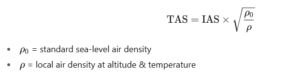
When compressibility (higher speeds or altitudes) becomes significant, formulas need to incorporate Mach number or pressure relationships. Wikipedia
In practice, flight computers (like E6B analog devices) or tools emulate these corrections. Gleim Aviation+1
Example Calculation
Suppose:
-
IAS = 150 knots
-
Pressure altitude = 8,000 ft
-
Outside air temperature = –10 °C
You plug these into the TAS calculator (or do the math manually). The result might be, for example, ~176 knots TAS (this is illustrative). The exact number depends on the actual density ratio computed by the tool.
How to Use the Calculator on E6BT
-
Input your IAS / CAS, pressure altitude, and OAT
-
Press “Calculate” (or equivalent)
-
Read the output: TAS, possibly density altitude or corrections
-
Use that TAS in your flight planning (ground speed, ETA, wind corrections, etc.)
Because the E6BT calculators are designed for aviators, the interface should be intuitive (units in knots, altitude in feet) and helpful.
Things to Watch Out For & Best Practices
-
Ensure you use consistent units (knots for speed, feet / meters for altitude, Celsius for temperature).
-
If using CAS vs IAS, verify which one the calculator expects.
-
For high-speed or high-altitude operations, compressibility effects may be more important (not just the basic square root density correction).
-
Use the calculator as a check, not a blind substitute for chart data or flight-computers.
-
Always be mindful of instrument / sensor errors in real-world systems.